

Nouveau Conception UI/UX
Barre de recherche
La recherche est l’un des moyens les plus fréquemment utilisés par les utilisateurs pour naviguer sur un site web ou une application. Une mauvaise expérience de recherche peut directement impacter la satisfaction des utilisateurs et, en fin de compte, les performances commerciales.
Cependant, la barre de recherche avec laquelle les utilisateurs interagissent n’est que la partie visible d’un processus de conception bien plus profond. Alors, comment créer une UX de recherche qui réponde véritablement aux besoins des utilisateurs ? Dans cette section, nous explorerons les principes clés d’une conception de recherche efficace.
Avant de commencer, il est important de se demander : votre produit a-t-il vraiment besoin d’une fonctionnalité de recherche ? Prenons du recul pour déterminer quand une interface de recherche est vraiment nécessaire.
Anatomie
La recherche comprend une barre de recherche et un conteneur pour les suggestions et les résultats. Le conteneur est vide par défaut.
- Conteneur de la barre de recherche
- Icône principale
- Texte d'accompagnement
- Bouton de soumission
- Texte de saisie
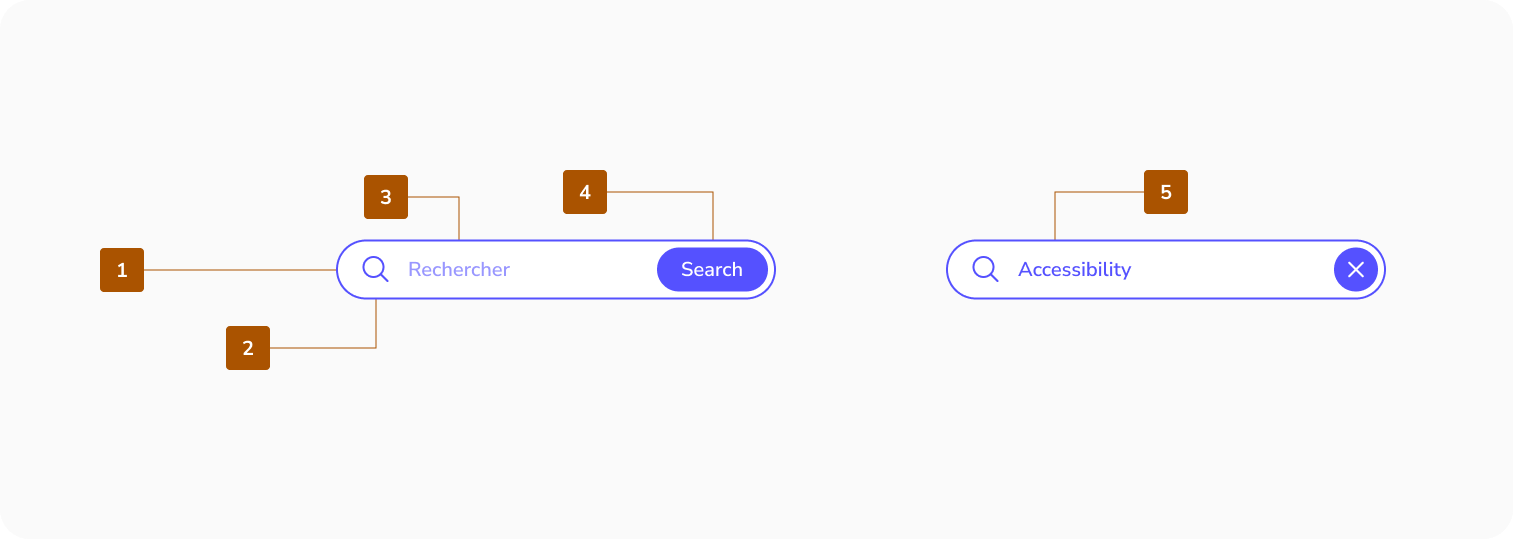
Zone cible

Bonnes pratiques de conceptions pour la barre de recherche
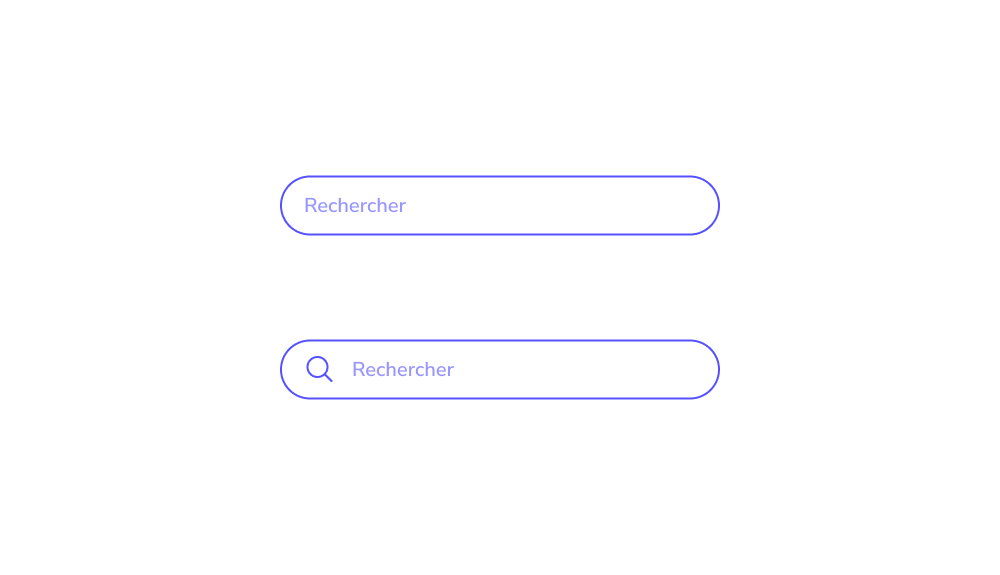
Utiliser un symbole de recherche universel
La loupe est largement reconnue comme l'icône de recherche standard. Les utilisateurs la cherchent instinctivement lorsqu'ils essaient de trouver une barre de recherche, de sorte que des alternatives trop créatives peuvent conduire à une expérience de recherche déroutante.
Gardez la loupe simple, avec un minimum de détails, et assurez-vous qu'elle dispose d'une grande zone facilement cliquable qui se distingue clairement dans l'interface.


Rendre votre barre de recherche visible
Masquer la barre de recherche oblige les utilisateurs à la chercher, ce qui entraîne une expérience de recherche frustrante. L'objectif est que les utilisateurs la localisent immédiatement en entrant sur la page. La visibilité est essentielle placez la barre de recherche dans un endroit stratégique. Comme les utilisateurs analysent généralement les pages selon un modèle en F, ils sont susceptibles de remarquer rapidement une loupe universellement reconnue.


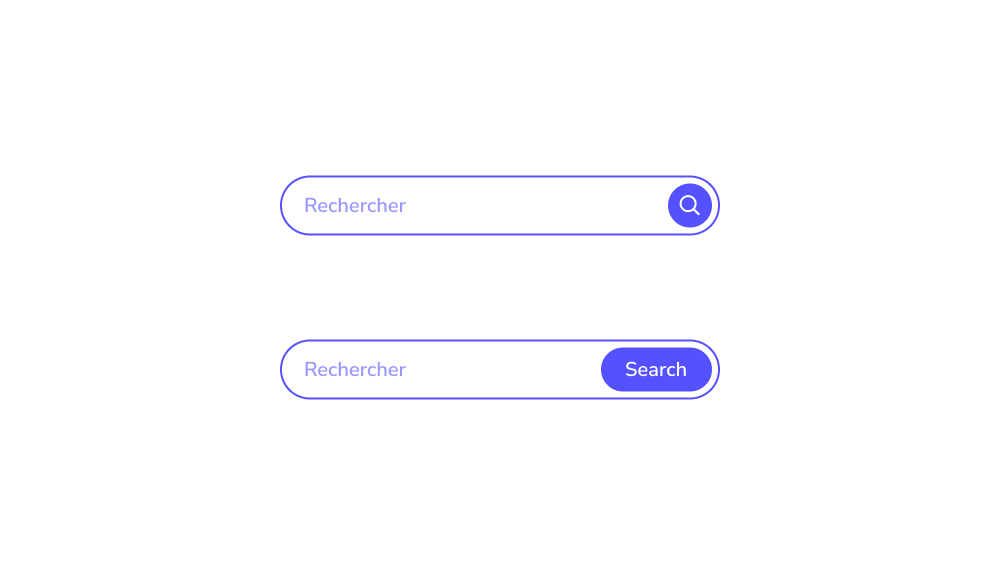
Inclure un bouton « Soumettre »
Alors que de nombreux utilisateurs lancent une recherche en appuyant sur « Entrée », certains préfèrent utiliser un bouton « soumettre » traditionnel. Sur les appareils mobiles, appuyer sur un bouton est souvent plus rapide et plus pratique qu'utiliser le clavier. Une UX de recherche bien conçue doit toujours inclure un bouton de soumission clairement visible.
Assurez-vous que le bouton est suffisamment grand pour être facilement touché ou cliqué, afin que les utilisateurs n'aient pas besoin de faire plusieurs tentatives, de changer de clavier ou de zoomer pour l'activer.
Rendre votre champ de recherche suffisamment long
Assurez-vous que la barre de recherche est suffisamment large pour accueillir l'intégralité de la requête de l'utilisateur. Sur les appareils mobiles qui représentent 79 % des achats en ligne il est particulièrement important que le champ de recherche occupe la majeure partie de la largeur de l'écran. Cela permet aux utilisateurs de saisir confortablement, quelle que soit la taille de leurs doigts, leur vue ou d'autres facteurs, améliorant ainsi l'utilisabilité et réduisant les erreurs.


Quand avez-vous besoin d'une barre de recherche ?
Tous les sites web ne nécessitent pas une fonction de recherche les sites simples d'une seule page sans projet d'expansion peuvent s'en passer. Cependant, pour de nombreuses plateformes, une expérience de recherche efficace est essentielle. Celles-ci comprennent :
- Sites e-commerce
- Places de marché
- Portails d'actualités
- Services de réservation
- Plateformes éducatives, telles que les bibliothèques ou les encyclopédies
En bref, tout grand site web avec des centaines d'entrées a besoin d'une UX de recherche bien conçue. Mais pourquoi la recherche est-elle si essentielle dans ces cas ? Et pourquoi le simple fait d'avoir une barre de recherche ne suffit-il pas à garantir le succès commercial ? Explorons cela plus en détail.
Placer une barre de recherche sur chaque page
Les utilisateurs n'utilisent pas toujours la recherche immédiatement en entrant sur un site web. Ils peuvent commencer par parcourir le site et ne recourir à la recherche que lorsqu'ils ne trouvent pas ce dont ils ont besoin. Pour cette raison, la barre de recherche doit être accessible sur chaque page. Obliger les utilisateurs à retourner à la page d'accueil uniquement pour effectuer une recherche crée une expérience frustrante et nuit à une bonne UX de recherche.
Nouveau Conception UI/UX
Barre de recherche
La recherche est l'un des moyens les plus fréquemment utilisés par les utilisateurs pour naviguer sur un site web ou une application. Une mauvaise expérience de recherche peut directement impacter la satisfaction des utilisateurs et, en fin de compte, les performances commerciales.
Cependant, la barre de recherche avec laquelle les utilisateurs interagissent n'est que la partie visible d'un processus de conception bien plus profond. Alors, comment créer une UX de recherche qui réponde véritablement aux besoins des utilisateurs ? Dans cette section, nous explorerons les principes clés d'une conception de recherche efficace.
Avant de commencer, il est important de se demander : votre produit a-t-il vraiment besoin d'une fonctionnalité de recherche ? Prenons du recul pour déterminer quand une interface de recherche est vraiment nécessaire.
La recherche comprend une barre de recherche et un conteneur pour les suggestions et les résultats. Le conteneur est vide par défaut.
- Conteneur de la barre de recherche
- Icône principale
- Texte d'accompagnement
- Bouton de soumission
- Texte de saisie
Zone cible
Utiliser un symbole de recherche universel
La loupe est largement reconnue comme l'icône de recherche standard. Les utilisateurs la cherchent instinctivement lorsqu'ils essaient de trouver une barre de recherche, de sorte que des alternatives trop créatives peuvent conduire à une expérience de recherche déroutante.
Gardez la loupe simple, avec un minimum de détails, et assurez-vous qu'elle dispose d'une grande zone facilement cliquable qui se distingue clairement dans l'interface.
Rendre votre barre de recherche visible
Masquer la barre de recherche oblige les utilisateurs à la chercher, ce qui entraîne une expérience de recherche frustrante. L'objectif est que les utilisateurs la localisent immédiatement en entrant sur la page. La visibilité est essentielle placez la barre de recherche dans un endroit stratégique. Comme les utilisateurs analysent généralement les pages selon un modèle en F, ils sont susceptibles de remarquer rapidement une loupe universellement reconnue.
Inclure un bouton « Soumettre »
Alors que de nombreux utilisateurs lancent une recherche en appuyant sur « Entrée », certains préfèrent utiliser un bouton « soumettre » traditionnel. Sur les appareils mobiles, appuyer sur un bouton est souvent plus rapide et plus pratique qu'utiliser le clavier. Une UX de recherche bien conçue doit toujours inclure un bouton de soumission clairement visible.
Assurez-vous que le bouton est suffisamment grand pour être facilement touché ou cliqué, afin que les utilisateurs n'aient pas besoin de faire plusieurs tentatives, de changer de clavier ou de zoomer pour l'activer.
Rendre votre champ de recherche suffisamment long
Assurez-vous que la barre de recherche est suffisamment large pour accueillir l'intégralité de la requête de l'utilisateur. Sur les appareils mobiles qui représentent 79 % des achats en ligne il est particulièrement important que le champ de recherche occupe la majeure partie de la largeur de l'écran. Cela permet aux utilisateurs de saisir confortablement, quelle que soit la taille de leurs doigts, leur vue ou d'autres facteurs, améliorant ainsi l'utilisabilité et réduisant les erreurs.
Tous les sites web ne nécessitent pas une fonction de recherche les sites simples d'une seule page sans projet d'expansion peuvent s'en passer. Cependant, pour de nombreuses plateformes, une expérience de recherche efficace est essentielle. Celles-ci comprennent :
- Sites e-commerce
- Places de marché
- Portails d'actualités
- Services de réservation
- Plateformes éducatives, telles que les bibliothèques ou les encyclopédies
En bref, tout grand site web avec des centaines d'entrées a besoin d'une UX de recherche bien conçue. Mais pourquoi la recherche est-elle si essentielle dans ces cas ? Et pourquoi le simple fait d'avoir une barre de recherche ne suffit-il pas à garantir le succès commercial ? Explorons cela plus en détail.
Placer une barre de recherche sur chaque page
Les utilisateurs n'utilisent pas toujours la recherche immédiatement en entrant sur un site web. Ils peuvent commencer par parcourir le site et ne recourir à la recherche que lorsqu'ils ne trouvent pas ce dont ils ont besoin. Pour cette raison, la barre de recherche doit être accessible sur chaque page. Obliger les utilisateurs à retourner à la page d'accueil uniquement pour effectuer une recherche crée une expérience frustrante et nuit à une bonne UX de recherche.